Build Your Setlist Online. Display It Live on Stage.
Add your full song library once, build setlists by dragging songs into order, and open Live Mode on stage — a full-screen chord and lyric display on any device.
No credit card required
What's included
Personal song library
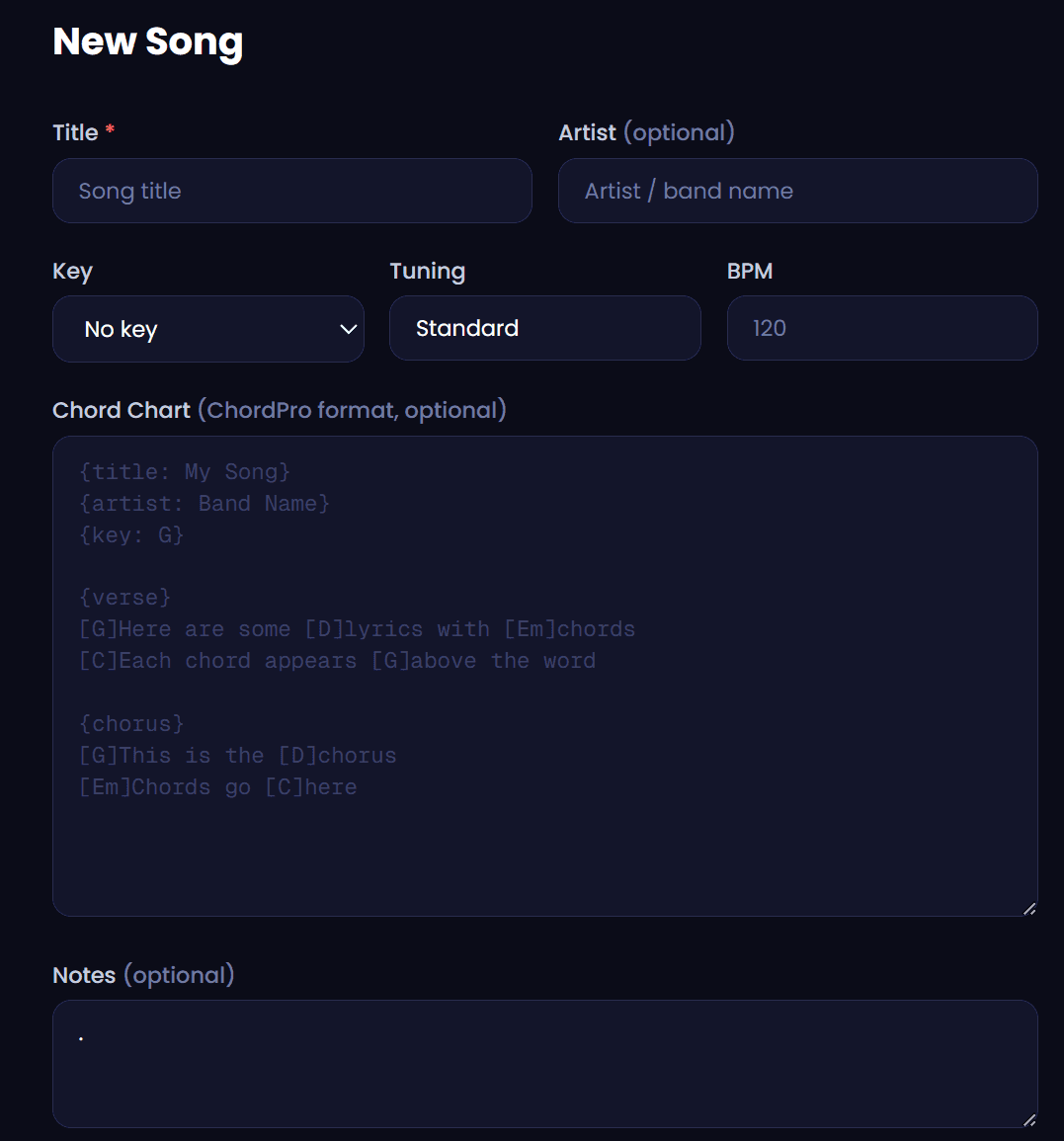
Add your full repertoire once with chords, keys and BPM — then drag songs into any setlist in seconds.
ChordPro chord charts
Lyrics and chords displayed in one clean view, correctly positioned above each word, ready for stage use.
Full-screen Live Mode
A full-screen display designed for on-stage use. Tap to advance songs. Works on any phone, tablet or laptop.
Your song library, any setlist, any stage
Add every song in your repertoire to your Dashplan library — title, key, BPM, capo, ChordPro chord chart — and it stays there permanently. Build a setlist for any show by dragging songs into order. Change the running order right before you go on stage. Share with your band. Open Live Mode and perform.
ChordPro is the industry standard format for inline chord charts: chords written in square brackets next to the lyric they land on. Dashplan renders them floating above the correct syllables in a clean, readable display. Import lyrics and add chord markup once — every setlist that pulls the song gets the correct chart automatically.
Live Mode is built for stage use. Open it on any device before you go on and the current song fills the screen with large, readable chords and lyrics. Tap to advance to the next song. Works on a phone propped on a music stand, a tablet at the keyboard, or a laptop at the back of the stage. No printing, no PDFs, no losing your place mid-show.
Your song library is permanent and shared. Every song you add — with its key, BPM, capo position and chart — stays in your library and can be pulled into any setlist you build. Build different setlists for different contexts: a weddings set, a corporate function set, a late-night covers set. All pull from the same library; all can be tailored independently.
Band members with a Dashplan account can access shared setlists and run Live Mode on their own devices. Everyone on stage has the same charts, in the same key, at the same time — without printing a single page or sending files to the whole band before the show.
Part of Dashplan — A$25/month
Every Dashplan tool is included. Band members join free.
Create free accountFrequently asked questions
What is ChordPro format?+
ChordPro is a text format for song charts where chords are written inline with lyrics in square brackets — for example: [G]Somewhere [C]over the rainbow. Dashplan renders them floating above the correct syllable in both the song view and Live Mode.
What is Live Mode?+
Live Mode is a full-screen display designed for on-stage use. The current song fills the screen with large, readable chords and lyrics. Tap to advance to the next song. Works on any device with a browser.
Can I share my setlist with band members?+
Yes. Band members with a Dashplan account can access shared setlists and use Live Mode on their own devices on stage.
Can I build multiple setlists?+
Yes. Build as many setlists as you need — one per gig, one per setlist type, or however you organise performances. Each pulls from the same shared song library.
Can I reorder songs in a setlist?+
Yes. Drag songs up and down to reorder them in any setlist at any time, including minutes before you go on stage.
How many songs can I add to my library?+
There is no hard limit. Add your full repertoire — hundreds of songs if needed.
Does the setlist maker work on mobile?+
Yes. Live Mode is specifically designed for phone and tablet use on stage. The full-screen display is readable at distance and advancing songs by tapping works reliably on a music stand or the floor.
Can I add notes to individual songs?+
Yes. Each song has fields for key, BPM, capo, and a notes field for performance reminders, arrangement notes or client-specific instructions.