Build & Share Your Band Stage Plot in Minutes.
Drag-and-drop stage layout editor. Add tech rider notes per member. Share a live link with any venue — no PDFs, no resending.
No credit card required
What's included
Drag-and-drop placement
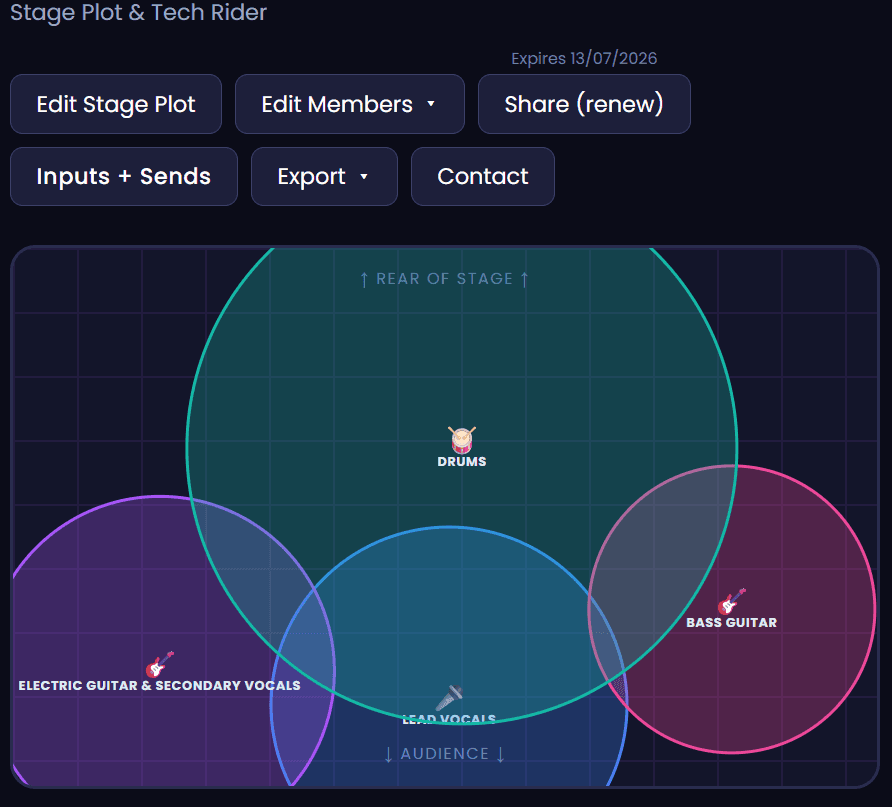
Position every band member, monitor, amp and mic on a visual stage grid in minutes.
Gear notes per member
Add monitor levels, input channels and tech rider details for each person on stage.
Instant share link
Share a live link with venues or export as PNG — always showing your latest setup.
The fastest way to make a stage plot
A stage plot is a diagram that shows a venue's sound engineer exactly where every band member stands on stage, what gear they're using, and what they need from the PA. Most venues ask for one before they confirm a booking — and a clear, professional stage plot tells them you're easy to work with.
Not sure how to make a stage plot? Dashplan's drag-and-drop editor makes it simple. Position every band member, monitor, amp and mic on a visual grid, add tech rider notes per person, and share via a live link — no design software, no PDFs.
Unlike PDF stage plots that go out of date and require resending, a Dashplan stage plot updates live. Change your setup and the link your venues already have reflects the new version immediately. One link, always current.
A well-made stage plot covers: each performer's position and instrument, their amp or DI configuration, monitor mix requirements per person, vocal mic placement, and input channel numbers. Dashplan's note fields let you add all of this per position so the engineer has everything before load-in.
Whether you're a 3-piece original band playing a local venue or a 9-piece function band at a corporate event, a professional stage plot is one of the clearest signals that you're an organised, reliable act. Venues notice, and it makes every soundcheck faster.
Part of Dashplan — A$25/month
Every Dashplan tool is included. Band members join free.
Create free accountFrequently asked questions
What is a stage plot?+
A stage plot is a diagram showing where every band member stands on stage, what instrument or gear they use, and what they need from the venue's sound system. Sound engineers use it to set up the stage before the band arrives.
What should I include in a stage plot?+
At minimum: every person's position and instrument, amp or DI setup, monitor requirements, and input channel numbers. Dashplan lets you add notes to each position for all of this.
Do I need a stage plot if I'm a small band?+
Yes — even a duo or trio benefits from a stage plot. It tells the venue engineer where to run cables, how many monitors you need, and what inputs to prepare. A clear stage plot means a faster, smoother soundcheck.
What's the difference between a stage plot and a tech rider?+
A stage plot is the visual diagram of positions and gear. A tech rider is a written document listing your full technical requirements — PA spec, backline, hospitality. Dashplan's per-member notes let you include tech rider details alongside the visual layout.
Can I share my stage plot without sending a PDF?+
Yes. Dashplan generates a live shareable link. Venues open it in a browser and always see the most current version — no email attachments, no resending.
Can I export my stage plot as an image?+
Yes. Export your stage plot as a PNG to include in emails, print for the stage, or attach to a tech rider.
Can I have different stage plots for different configurations?+
Yes. You can save multiple stage plots in Dashplan — one for your full band setup, one for a stripped-back acoustic duo set, or any variation you perform. Share the relevant one per booking.
Can band members view the stage plot?+
Yes. Band members who join your Dashplan account can view the current stage plot from their own dashboard — useful before load-in so everyone knows the plan.